
I can't connect my treadmill.

Consult the user manual for your mat.
Does your mat have a Bluetooth FTMS protocol?
Check your mat's specifications to see if it's compatible with this FTMS standard. Verify that the connection protocol isn't a proprietary one.
Does your mat have a specific connection procedure?
Some devices have secure connection procedures. Check the procedure in your training device's user manual.
Is your mat compatible with third-party applications?
You can check with the manufacturer whether it is possible to connect your device to applications such as Kinomap or Zwift.
The PAIRFS software uses the same communication protocol as these applications.
Check for updates to your device
A new update may be available for your treadmill. It may allow you to connect your training device.
Check the connections on your device
If your treadmill is already connected to a third-party application or device (such as your computer), it will not be possible to connect it to the PAIRFS software.
Check that your mat is not connected to another application or device.
And if it persists?
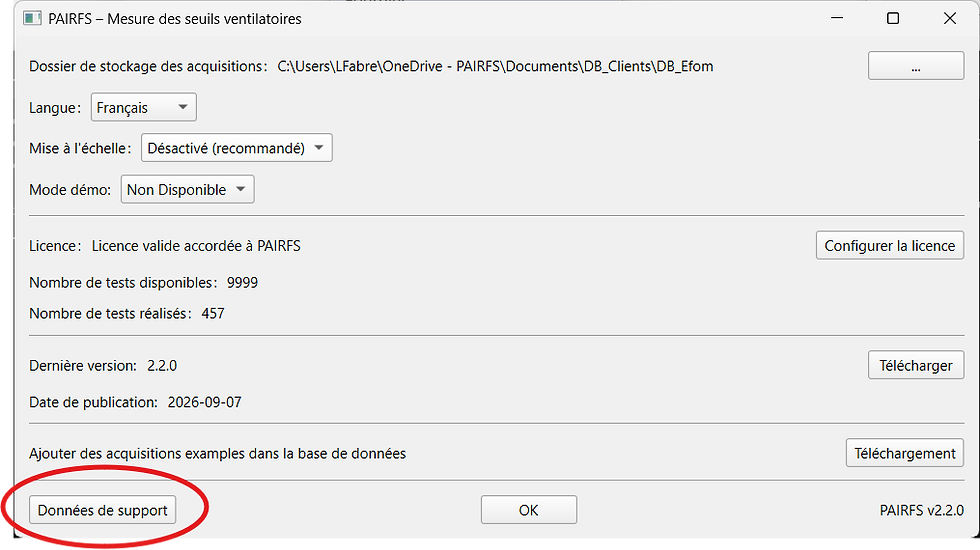
If you are still unable to connect, go to your PAIRFS settings and download the support data. Send it to us at support@pairfs.com .


Comments